> For the complete documentation index, see [llms.txt](https://help.smartcv.co/llms.txt). Markdown versions of documentation pages are available by appending `.md` to page URLs; this page is available as [Markdown](https://help.smartcv.co/approval-workflows-overview.md).
# Approval Workflows Overview
Approval Workflows allow your organization to define structured approval processes for recruitment-related actions.
Instead of manually deciding who must approve each request, reusable Approval Workflow templates can be created in advance and applied when required.
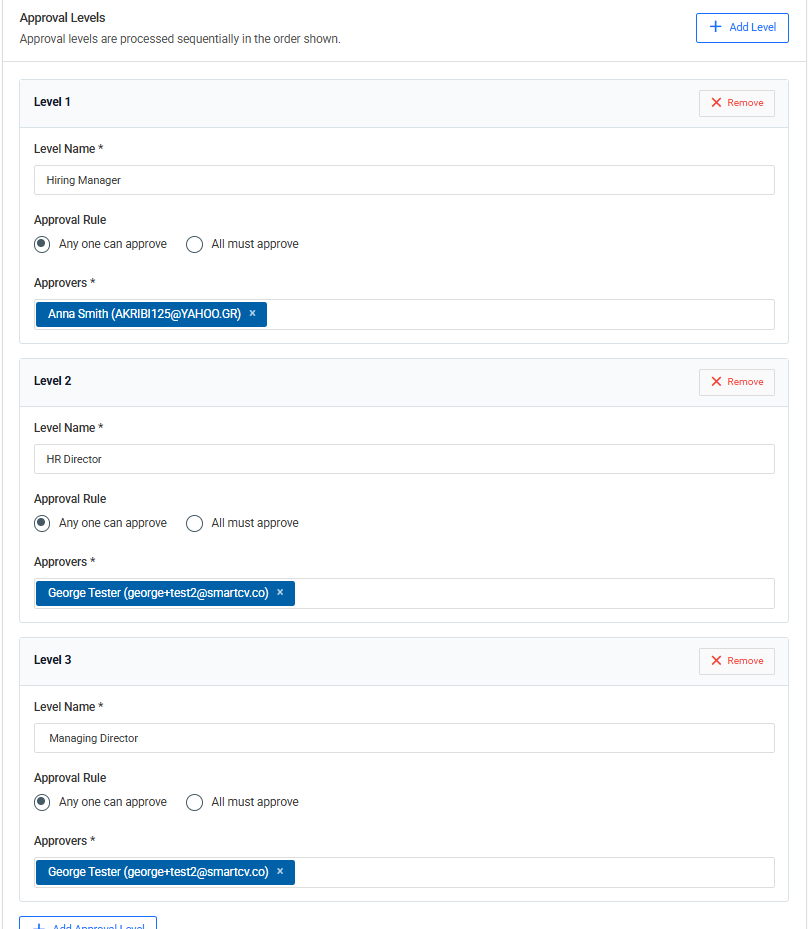
An Approval Workflow can contain multiple approval levels, with one or more approvers assigned to each level.
For Requisitions, this makes it possible to ensure that a hiring request receives the required internal authorization before it progresses.
To learn about the hiring requests that use these workflows, see Requisitions. \
For information about higher-level recruitment planning, see Hiring Plans.
**Approval Workflow templates**
Approval processes are configured as reusable templates.
A template defines the sequence of approvals that should take place.
For example:
Level 1 – Hiring Manager \ ↓
Level 2 – HR Director \ ↓
Level 3 – Managing Director
When the workflow is applied to a Requisition, Worklife Recruit uses this structure to manage the approval process.
Using templates avoids rebuilding the same approval structure for every new request.
**Approval levels**
An Approval Workflow can contain multiple levels.
Levels are processed sequentially.
The second level does not become active until the first level has been successfully completed, and so on.
This allows organizations to model processes such as:
1. Department Manager approval;
2. HR approval;
3. Finance approval;
4. Management approval.
The number and purpose of the levels can be adapted to the organization’s own process.
**Multiple approvers**
Each approval level can contain one or more approvers.
For levels with multiple approvers, the workflow determines whether approval is required from:
* Any One approver; or
* All approvers.
**Any One**
With the Any One rule, only one of the assigned approvers needs to approve the level.
As soon as one approver approves, the level is considered approved and the workflow can continue to the next level.
Other approvers at that level no longer need to take action.
This is useful when several people have equivalent authority and approval from any one of them is sufficient.
**All**
With the All rule, every assigned approver must approve.
The level remains pending until all required approvers have approved it.
This is useful when a decision requires agreement from several people or functions.