> For the complete documentation index, see [llms.txt](https://help.smartcv.co/llms.txt). Markdown versions of documentation pages are available by appending `.md` to page URLs; this page is available as [Markdown](https://help.smartcv.co/interviews/scheduling-an-interview.md).
# Scheduling an Interview
Interviews are scheduled from the candidate’s application in Worklife Recruit.
Select the appropriate action to schedule a new interview for the candidate.
\[SCREENSHOT: Schedule Interview action from candidate application]
The Schedule Interview page allows you to define all the necessary interview details.
**Participants**
Select one or more Worklife Recruit users who will participate in the interview.
These can include recruiters, hiring managers, or other members of the hiring team.
\[SCREENSHOT: Interview participants selection]
**Interview Details**
Enter the interview information, including:
* Date
* Time
* Duration
* Interview round, such as HR Interview or Technical Interview
* Candidate email
* Language
* Time zone
The selected time zone determines how the interview time is displayed and communicated to participants.
\[SCREENSHOT: Interview Details section]
**Meeting Details**
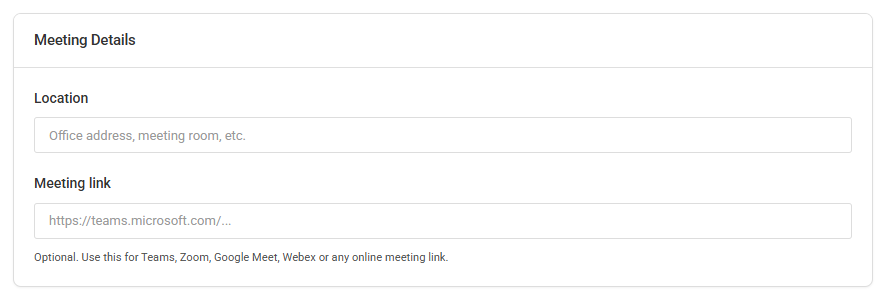
For an in-person interview, you can enter a location such as an office address or meeting room.
For an online interview, enter the meeting link. Links from services such as Microsoft Teams, Zoom, Google Meet, Webex, or other online meeting platforms can be used.
\[SCREENSHOT: Meeting Details section]
**Invitation Email**
You can customize the invitation email that will be sent to the candidate.
The invitation includes the interview’s key information, such as date, time, duration, location, and meeting link where applicable.
You can also select an existing Email Template and insert its content directly into the invitation message.
\[SCREENSHOT: Invitation Email and Email Template selection]
The language selected for the interview determines the language of the system-generated information in the candidate invitation.
Saving or Sending the Interview
When scheduling an interview, you have two options:
Save as Draft saves the interview without sending invitations. You can return to it later, make changes, and send the invitations when ready.
Save and Send Invitations saves the interview and sends the invitations to the candidate and interview participants.
Calendar invitations are included as ICS files, allowing recipients to add the interview to their calendars.
Hiring managers and interview participants also receive the candidate’s CV as a PDF attachment and a link to view the candidate’s profile in Worklife Recruit.
\[SCREENSHOT: Save as Draft and Save and Send Invitations buttons]
**Managing an Interview**
From the Interviews page, the available actions depend on the current status of the interview.
You can:
* Edit interview details
* Resend invitations
* Mark an interview as completed
* Cancel an interview
* Record a candidate no-show
* Record an interviewer no-show
* Return an interview to Draft when corrections are required
* Delete a Draft interview
\[SCREENSHOT: Interview row actions menu]
**Returning an Interview to Draft**
If an interview status was changed by mistake or the interview needs to be revised, you can use Return to Draft.
The interview becomes editable again without automatically notifying participants. Once the necessary changes have been made, you can save it or send new invitations.
This provides a simple way to correct mistakes without having to create a new interview.
**Editing an Interview**
Open an interview to view its complete details.
Draft and Scheduled interviews can be edited. Interviews in finalized statuses remain available so that their details can still be reviewed.
When editing an active interview, you can update its participants, date and time, meeting information, invitation content, and internal notes.
\[SCREENSHOT: Edit Interview page]
When required, use Save and Send Invitations to send the updated interview information to the candidate and current participants.
**Internal Notes**
Internal notes can be added to an interview for the recruitment team.
These notes are available internally and are not visible to the candidate.
\[SCREENSHOT: Internal Notes section]